


PA Toll Pay
3.2596.00 Reviews
App Specs
- Version
- 2.2.81
- Updated On
- License
- Free
- Downloads
- 500,000+
- Developer
- TransCore / Pennsylvania Turnpike Commission
- Categories
- Travel & Local
- Platform
- Android, iOS
Screenshots
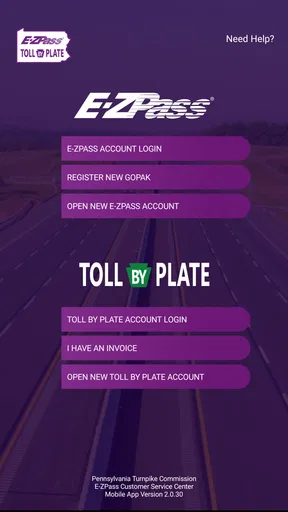
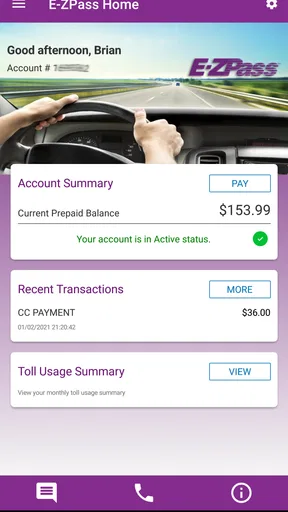
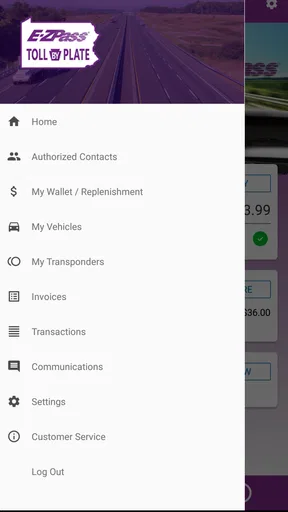
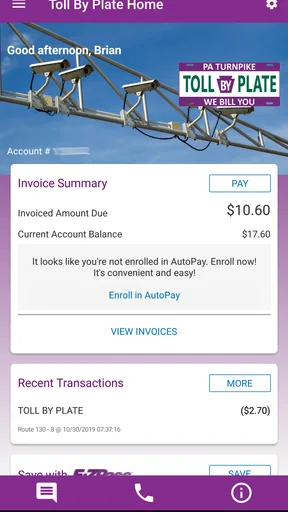
 Analysis by AppCompare
Driving on the Pennsylvania Turnpike is one of those situations where a small account-management task can become surprisingly distracting. PA Toll Pay is built for that narrow but useful job: it gives drivers a mobile place to view and manage a Pennsylvania Turnpike E-ZPass or Toll By Plate account. I tested it with that practical mindset, looking less at flashy extras and more at whether it helps me understand charges, keep account details under control, and deal with toll-related administration without reaching for a desktop browser.
The app is free, aimed at Everyone, and belongs in the Travel & Local category rather than in the navigation-app group. That distinction matters. It is not the tool I would open to find a route, compare traffic, or replace a dedicated map. Its value begins when the trip has already happened or when I need to prepare my toll account before driving. TransCore and the Pennsylvania Turnpike Commission are listed as the developers, which fits the app's focused purpose and official-account approach.
How PA Toll Pay fits into real toll-account routines
I find PA Toll Pay most useful when more than one person in a household shares the work of keeping a Pennsylvania Turnpike account in order. Before a trip, one person can check the account while another confirms which vehicle is being used; afterward, they can compare the trip with the toll activity while it is still easy to remember. That simple division of effort makes account access practical, but it also makes careful attention to whose account is open especially important.
A focused companion rather than a driving assistant
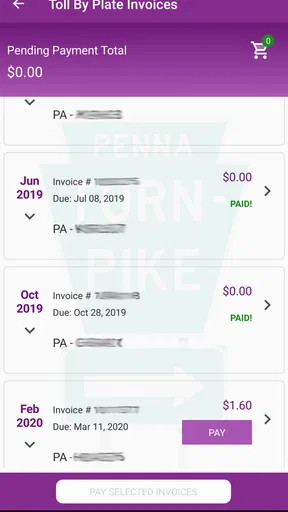
My first impression is that PA Toll Pay works best when I treat it as an account counter, not as a complete travel companion. The store summary points to two account types, E-ZPass and Toll By Plate, and that makes the app relevant to more than one kind of Pennsylvania Turnpike user. Someone with a transponder can use it as a convenient way to keep an eye on the account, while a driver who receives toll charges through plate-based processing has a different reason to check in: identifying what needs attention and managing the related account information.
This narrow focus is a strength because it avoids burying toll information inside route planning, fuel prices, hotel searches, or unrelated travel tools. When I open it, my goal is usually specific. I want to check whether an account needs attention, review a toll-related entry, or handle an account task while I am away from a computer. A general navigation app cannot replace that kind of account access, and a bank app usually shows only a payment after it has been processed, not the toll-account context around it.
At the same time, the limited scope sets expectations correctly. I would not install PA Toll Pay expecting turn-by-turn directions, a live road map, or a broad Pennsylvania travel guide. If my main need is avoiding congestion or calculating a route, a navigation service is the better first choice. This app becomes useful at the administrative edges of a journey, where the question is not “Which road should I take?” but “What happened to my toll account, and what should I do next?”
The everyday scenario where it earns its place
Imagine returning from a weekend drive and remembering that the route included the Turnpike. Instead of waiting until a paper notice or a later account reminder, I can open PA Toll Pay and check the relevant account from my phone. If I am managing a Toll By Plate account, that quick check is especially practical because the account is tied to travel and vehicle information rather than only to a physical transponder. If I use E-ZPass, the same habit helps me keep an eye on the account before the next trip.
Worth Reading Before You Choose

EA SPORTS FC Mobile 26 Is a Bigger Football Game, but It Takes Time

Flipboard Shows What News Apps Must Do Beyond the Feed

Switching to Android Auto Means Rethinking Your Driving Routine

Google Calendar Makes a Crowded Week Easier to Manage

Ludo King Makes the Most of the Minutes Between Plans

Baby Panda World Brings Quick Play to Modern Phones, but Its Game Library Feels Busy
Another realistic use is preparing for a longer drive. I can check the account before leaving, confirm that I am looking at the right account, and deal with an issue while there is still time to resolve it. That is a better workflow than discovering a problem at the end of a trip, when I am tired and trying to reconstruct where I drove. The app does not make tolls disappear, but it can make the surrounding paperwork less easy to forget.
My practical tip is to use it at predictable moments rather than only when something goes wrong: before a Turnpike journey, after returning home, and whenever a vehicle or account detail changes. That routine turns a reactive tool into a small piece of travel organization. It is also a useful distinction between PA Toll Pay and a normal payment app: the former is tied to the toll account, while the latter is usually the final step after a charge has already reached a card or bank account.
What the current release tells me about the product
The current version is 2.2.81, and the app has been available since February 2019. That combination suggests a product that has had time to mature rather than a brand-new experiment. I see the version number as evidence of ongoing maintenance, but not as proof that every part of the experience will feel modern or equally polished. A version update can improve reliability or account handling without changing the basic shape of the app.
For existing users, that continuity is reassuring. An account-management app benefits from familiarity: once I know where to find the information I need, I do not want the entire workflow redesigned every few weeks. The trade-off is that a focused utility can feel less ambitious than newer travel apps. PA Toll Pay's evolution appears to be about maintaining access to its core purpose, not turning it into a full travel platform. That is the right direction for a toll service, provided the essential account tasks remain clear and dependable.
The minimum operating-system requirement is Android 5.0, which makes the app accessible to people using older Android hardware. That can matter for drivers who keep an older phone in the car or do not replace devices frequently. However, compatibility alone is not the same as a perfect experience on every older handset. I would still keep the phone's system and app installation current where possible, especially before relying on the app during a trip.
What existing users gain from using it regularly
The biggest benefit is centralization. Instead of searching through old emails, opening a browser, or trying to remember which account page handles which toll situation, I have one app associated with Pennsylvania Turnpike toll management. That saves time in small increments, which is exactly how an administrative app proves its value. The convenience is not dramatic every day, but it becomes noticeable when I need information quickly.
Regular checking also changes how I handle uncertainty. A toll charge can be easy to forget when it is connected to a trip from several days ago. Looking at the account soon after driving gives me a better chance of recognizing the vehicle, the journey, and the reason for the charge. My second practical tip is to review an unfamiliar entry while the trip is still fresh, rather than postponing it until several journeys have blended together. That is not a glamorous feature, but it is a genuinely useful workflow that a short store description would not explain.
The app can also be helpful for households with more than one driver or vehicle, although I would approach every account change carefully. Before editing anything, I would confirm that I am viewing the intended account and vehicle context. Toll administration is not an area where I want to make a rushed change from a moving car or while standing in a queue. I prefer to use the app while parked, on a stable connection, and with enough time to read confirmation details.
That caution points to an important boundary: PA Toll Pay is convenient, but it should not encourage distracted driving. I would never use it while operating a vehicle. If a toll concern appears during a journey, I would wait until I am safely parked or ask a passenger to handle only the simplest check. The app's mobile format makes access easier; it does not remove the need for sensible timing.
Where the mobile experience can still create friction
Account apps are judged by clarity more than entertainment, and that means small points of friction matter. A user may arrive with a very specific question: whether a payment went through, which vehicle is connected to an account, or what a particular toll entry means. If the answer is not immediately obvious, the experience can feel slower than expected even when the underlying account system is working correctly. My advice is to approach each visit with one task in mind and read the account labels carefully instead of tapping through screens at random.
Login and account verification are another practical consideration. I would keep the account details I normally use for Pennsylvania Turnpike toll management available before beginning, particularly if I am setting the app up shortly before a trip. I would also avoid experimenting with account changes when I am in a hurry. A desktop browser may be preferable for a complicated correction because a larger screen gives me more room to review information before confirming it.
This is where PA Toll Pay differs from a standard navigation app. Navigation tools are designed for quick visual decisions while planning movement, whereas toll-account tools are designed for careful record handling. The app is more useful when I slow down and verify what I am seeing. That is not necessarily a flaw, but it means the best user experience depends partly on choosing the right moment and device for the task.
Its average rating is 3.2 from around 1.2 thousand ratings, with around 595 written reviews. I read that as a sign of a functional but not universally smooth experience. The rating is neither a reason to dismiss the app nor a guarantee that every account interaction will be effortless. For me, the sensible approach is to install it because the official account access is relevant, then judge it by whether it reliably handles my own toll routine rather than expecting the polish of a large consumer travel platform.
Who should use it and who should choose something else
I would recommend PA Toll Pay to Pennsylvania Turnpike drivers who already manage an E-ZPass or Toll By Plate account and want mobile access to that account. It is particularly suitable for people who travel the Turnpike often enough that checking toll activity, preparing an account before a trip, or handling an account task away from a computer would save them time. It also makes sense for drivers who prefer keeping official travel administration separate from their general banking and navigation apps.
I would be more hesitant to recommend it to someone who rarely uses the Pennsylvania Turnpike and has no active toll-account reason to check. Installing another app for a single occasional journey may not add much value if the person is comfortable using the regular web account route. Likewise, a traveler looking for maps, road alerts, parking discovery, or itinerary planning should choose a dedicated travel app instead. PA Toll Pay is not a replacement for those tools, and expecting it to be one will lead to disappointment.
It is also not the best choice for someone who wants all financial activity in one place. A bank or card app may be better for monitoring the final payment, while PA Toll Pay is better for understanding the toll-account side. These tools answer different questions. I would use the toll app to investigate the account and the financial app to confirm the transaction, rather than forcing either application to do both jobs.
Small habits that make the app more useful
My most useful workflow is to separate checking from editing. First I review the account and identify what needs attention. Then, only after confirming the account and vehicle context, I make a change. This two-step habit reduces the chance of acting on the wrong information, especially for households where several vehicles or drivers are involved. It also gives me a clear point to stop if the information does not match what I expected.
A second habit is keeping a simple personal travel note for unusual trips. I do not need a detailed diary; a date, vehicle, and general route can be enough to recognize a toll entry later. That makes PA Toll Pay more useful because the app supplies the account view while my note supplies memory. The combination is stronger than relying on either a vague recollection or a bank statement alone.
A third tip is to choose the browser when the task becomes document-heavy or requires careful comparison. The phone is excellent for a quick account check, but a larger screen can be more comfortable for reviewing several pieces of information. I see the app as the fast-access option, not a rule that every toll-account task must happen on a phone. That trade-off keeps the mobile experience convenient without pretending that small-screen work is always ideal.
Finally, I would install and sign in before the day of a major trip. Doing so gives me time to resolve a login issue, verify that I am using the intended account, and become familiar with the layout while parked at home. It is a simple preparation step, but it prevents the common mistake of treating a travel utility as something to configure at the roadside.
What I would watch as the app continues to evolve
Because the app has reached version 2.2.81 after being available for several years, I would watch for improvements that make account information easier to interpret rather than additions that broaden the app unnecessarily. Clearer explanations around toll entries, smoother account switching where relevant, and a more direct path from an issue to the appropriate action would have more value to me than unrelated travel features.
I would also pay attention to how well the app serves both E-ZPass and Toll By Plate users without making either group feel secondary. Their needs overlap, but they are not identical. A transponder user may care about account status and trip-related activity, while a plate-based user may need especially clear guidance when matching a vehicle or charge to a journey. The best future updates would preserve the focused purpose while reducing uncertainty for both account types.
Reliability should remain the priority. A toll app does not need to imitate a social network or a sophisticated itinerary planner. It needs to open when I need it, present account information in a readable way, and let me complete ordinary management tasks without unnecessary confusion. The current version and long availability indicate continued product attention, but the real measure for me is whether each update makes those core moments calmer and more predictable.
My final view after using it
PA Toll Pay is a practical, specialized app that earns its place on the phone of an active Pennsylvania Turnpike toll-account holder. I like that it stays centered on E-ZPass and Toll By Plate management instead of pretending to be a complete travel service. The free price and Everyone age rating make it easy to try, and its broad Android compatibility is helpful for drivers who are not using a new device.
My recommendation comes with a clear condition: use it for toll-account administration, not for navigation or general trip planning. Keep a browser or larger screen in mind for complicated tasks, check the account before and after relevant journeys, and always make changes while parked and attentive. The app's moderate 3.2 average rating suggests that some users encounter friction, so I would not promise a flawless experience. Still, for the specific job it is designed to handle, the convenience of mobile access is meaningful.
With more than 500 thousand installs, it is clearly serving a substantial group of drivers. I would choose it when official Pennsylvania Turnpike account access matters more than having every travel feature in one place. If that describes your driving routine, PA Toll Pay is worth trying; if it does not, a normal browser, banking app, or navigation tool may be the more sensible option. Its real strength is focused access to toll-account details at the moment you need them.
Pros
- Pay Pennsylvania tolls quickly from your phone
- Conveniently manage multiple vehicle license plates
- Secure account access helps protect payment details
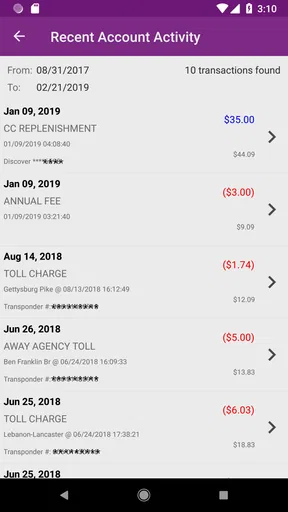
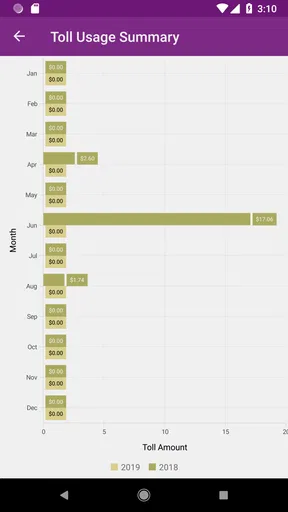
- View toll activity and payment history in one place
- Useful for drivers who frequently use Pennsylvania toll roads
Cons
- Requires an account and vehicle information to get started
- Coverage is limited to participating Pennsylvania toll facilities
- Incorrect plate details may cause payment or notice issues
- App usefulness is lower for drivers who rarely pay tolls
- Some features may depend on an active internet connection
FAQs for PA Toll Pay
What is PA Toll Pay, and what can I use it for?
PA Toll Pay is Pennsylvania’s electronic toll payment service for drivers using eligible toll roads, bridges, and highways. It allows you to pay tolls online without stopping at a booth, review toll transactions, manage vehicle and payment details, and handle unpaid toll notices when available. The service is especially useful for drivers who do not have an E-ZPass account or who occasionally travel through Pennsylvania.
Do I need an E-ZPass account to use PA Toll Pay?
No. PA Toll Pay is designed to help drivers pay certain Pennsylvania tolls even if they do not have an E-ZPass transponder. Depending on the toll facility and the type of notice received, you may be able to enter your license plate and payment information to settle the balance. However, availability can vary, so it is important to check the official notice or account details before assuming every toll can be paid through the service.
How do I pay a toll through PA Toll Pay?
To pay a toll, you generally need information such as your license plate number, the state where the plate was issued, and details from the toll invoice or notice. After locating the relevant transaction, you can review the amount due and submit payment using an accepted method, such as a debit or credit card. Carefully verify the plate and notice information before completing the payment.
Are there additional fees or penalties when using PA Toll Pay?
The amount shown through PA Toll Pay may include more than the original toll, particularly if the payment is connected to an invoice, missed payment, or overdue notice. Administrative charges, processing fees, or late penalties may apply depending on the circumstances. Before confirming your payment, review the complete total and any listed deadlines. Paying promptly can help prevent additional charges or collection-related problems.
Is PA Toll Pay safe and available on both Android and iPhone?
PA Toll Pay should be accessed through Pennsylvania’s official toll-payment website or an officially published mobile application, rather than through an unknown third-party app. Before entering license plate, address, or card information, confirm that the service is legitimate and that the website address or app publisher matches the official Pennsylvania toll authority. Availability and features may differ between Android, iOS, and mobile browsers, so always use the current official download or payment link.


